OWO Skin Haptic Integration for Gorilla Tag — Sensations & Setup
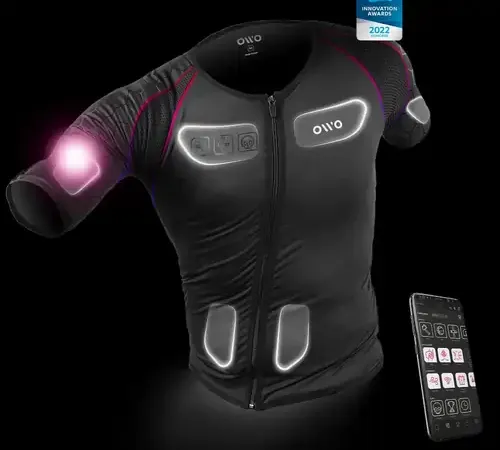
What Is OWO Integration Mod?
The OWO Integration Mod connects Gorilla Tag to the OWO Skin wireless haptic gaming suit. Unlike traditional rotary motor vests, the OWO suit utilizes high-precision Electrical Muscle Stimulation (EMS) micro-currents to stimulate muscle groups in your abdomen, pectorals, back, and arms.
This allows the mod to recreate genuine physical sensations: the sharp sting of being tagged by a lava monke, the pressure of grasping a thick redwood tree trunk, and the sustained air resistance of falling off a tall canopy branch.
Custom Sensations & Muscle Profiles
- Infection Tag Shock: Delivers an instant, crisp contracting sensation across the torso muscle quadrant where tag contact occurred.
- Canopy Wind Rush: A gentle, continuous pulsing wave across your chest that increases in frequency as your avatar reaches maximum terminal velocity.
- Physical Wall Bounce: Short compressive micro-bursts in your abdominal muscles when performing aggressive horizontal wall-bounces.
- Customizable Intensity Calibration: Supports full calibration via the official OWO mobile app, allowing you to dial sensation strength between gentle tingle and intense muscle contraction.
Safety & Health Advisory
The OWO Skin utilizes EMS technology. Do not use this mod or the OWO suit if you have a cardiac pacemaker, implanted defibrillator, or other electronic medical devices. Keep initial calibration levels below 40% until your muscles adjust to the virtual stimuli.
Setup & Pairing Instructions (PC VR)
- Put on your OWO Skin suit and ensure electrodes have proper skin contact.
- Launch the OWO App on your PC or smartphone and establish the Bluetooth connection.
- Download
GorillaTagOWO.dllfrom the link below. - Move the file into:
C:\Program Files (x86)\Steam\steamapps\common\Gorilla Tag\BepInEx\plugins\ - Launch Gorilla Tag through SteamVR. The console will report “OWO Client Connected: Device Active”.
Ready to Download?
Click below to go to the official verified repository for this mod. We only link to authorized releases on GitHub, mod.io, or Nexus Mods.
You Might Also Like
APE ARENA for Gorilla Tag — Download & Install Guide
Download APE ARENA for Gorilla Tag for free. Read our step-by-step setup guide and access direct download links for gameplay.

Banana Platforms Mod for Gorilla Tag — Download & Install Guide
Download Banana Platforms Mod for Gorilla Tag for free. Read our step-by-step setup guide and access direct download links for gameplay.
Bark Mod for Gorilla Tag — Download & Install Guide
Download Bark Mod for Gorilla Tag for free. The ultimate gameplay and utility mod featuring spectator cameras, platforms, and custom cosmetics.