Monke Map Loader for Gorilla Tag — Download & Install Guide
What Is Monke Map Loader?
Monke Map Loader is one of the most transformative mods in Gorilla Tag. In the vanilla game, players are restricted to a set number of official environments, including Forest, Canyons, Caves, Mountains, City, and Clouds. While these environments are highly detailed, players who spend hundreds of hours in-game often crave new structures and fresh parkour layouts.
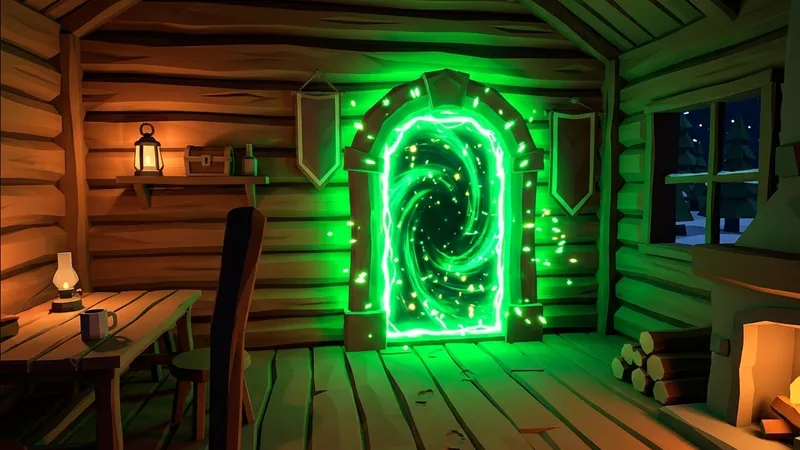
Monke Map Loader solves this by allowing players to download, load, and play on custom, community-created maps. These maps range from simple obstacle courses and climbable towers to massive cities, retro Mario levels, and futuristic spacescapes. The mod sets up a portal inside the treehouse that you can physically jump into to teleport to your selected custom map. It is the ultimate mod for players who want to expand their boundaries.
What Does Monke Map Loader Add to Gorilla Tag?
Monke Map Loader introduces a robust map loading engine and a physical, in-game teleporter portal. Key features include:
- Custom Map Engine: Renders community-made maps (typically
.gtmapfiles) with custom assets, textures, triggers, and gravity settings. - In-Game Map Portal: Adds a glowing neon lime portal inside the treehouse. Walk into the portal to load your custom level.
- Keyboard Selection Screen: Integrates with your treehouse computer, allowing you to scroll through and select your maps.
- Multiplayer Custom Map Rooms: Automatically connects you to custom rooms with other players who are loading the same map, letting you play multiplayer custom games.
Is Monke Map Loader Safe to Use?
Yes, Monke Map Loader is safe. The framework is open-source and reviewed by the community.
However, custom maps themselves are created by third-party designers. While the mod sandboxes custom maps to prevent system level damage, downloading .gtmap files from untrusted sources is not recommended. Stick to verified sharing channels like the official Gorilla Tag Modding Discord. Additionally, because Monke Map Loader routes you to custom lobbies, it is highly secure against anti-cheat bans. You will be in a dedicated modded room where game-breaking features are expected, minimizing your risk of bans.
How to Install Monke Map Loader on Gorilla Tag
To make this guide useful for everyone, we have provided steps for both PC VR and standalone Quest players.
On PC (Steam / VR Link)
Ensure BepInEx is installed and active on your PC before starting this installation.
- Locate your plugins directory: Find your Gorilla Tag files, typically at:
C:\Program Files (x86)\Steam\steamapps\common\Gorilla Tag\BepInEx\plugins\. - Download the mod files: Click the download button at the bottom of this page. Download the latest
MonkeMapLoader.dllfile. - Copy the DLL: Move
MonkeMapLoader.dlldirectly into yourBepInEx\plugins\folder. - Create the Maps directory: Inside your
BepInEx\plugins\folder, create a new subfolder namedCustomMaps. It should look like:BepInEx\plugins\CustomMaps\. - Download custom maps: Find
.gtmapfiles on community sites and drop them into theCustomMapsfolder. - Launch Gorilla Tag: Stand in front of the computer terminal, select your custom map, and hop into the portal.
On Meta Quest (Standalone / QuestPatcher)
For standalone Meta Quest headsets, custom maps can be sideloaded using QuestPatcher:
- Enable Developer Mode on your Meta Quest via the mobile app.
- Open QuestPatcher on your PC and connect your Quest using a USB cable.
- Patch your game inside QuestPatcher if you haven’t already.
- Drag and drop the Quest-specific
MonkeMapLoader.qmodfile into QuestPatcher. - In QuestPatcher, navigate to the “Mods” or “Assets” section.
- Drag and drop your downloaded
.gtmapfiles directly into the custom maps area in QuestPatcher to sync them to your Quest. - Disconnect your headset and launch Gorilla Tag to explore.
Compatibility
Monke Map Loader is designed for Steam VR builds running BepInEx 5.x.
Works on:
- Steam VR versions.
- Standalone Quest (via QuestPatcher).
Important Notes:
- Maps must end in
.gtmap. Files with other extensions will not be recognized. - Some complex custom maps require highly performant hardware. If you experience massive lag spikes or crashes, select a smaller map or reduce your VR graphics settings.
Frequently Asked Questions
Why isn't the portal appearing in the treehouse?
Can I play with friends on custom maps?
Why does my game crash when I walk into the portal?
Last updated: August 2026
Ready to Download?
Click below to go to the official verified repository for this mod. We only link to authorized releases on GitHub, mod.io, or Nexus Mods.
You Might Also Like
50 Stage Obby for Gorilla Tag — Download & Install Guide
Download 50 Stage Obby for Gorilla Tag for free. Read our step-by-step setup guide and access direct download links for maps.
ABOVE THE CLOUDS (Only Up) for Gorilla Tag — Download & Install Guide
Download ABOVE THE CLOUDS (Only Up) for Gorilla Tag for free. Read our step-by-step setup guide and access direct download links for maps.
Above the Clouds (Knockout) for Gorilla Tag — Download & Install Guide
Download Above the Clouds (Knockout) for Gorilla Tag for free. Read our step-by-step setup guide and access direct download links for maps.