Long Arms Mod for Gorilla Tag — Arm Reach Scaling & Private Room Testing
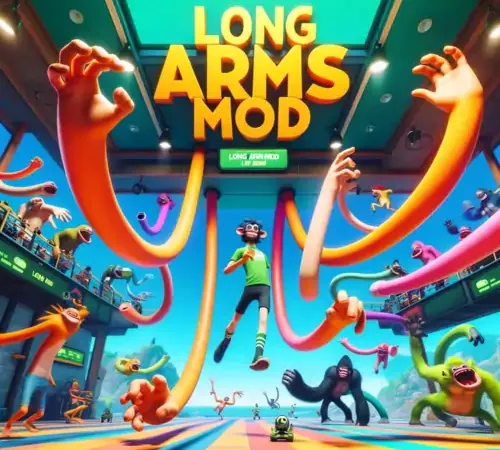
What Is the Long Arms Mod?
In competitive Gorilla Tag, physical arm span is one of the most decisive physiological factors. Players with longer real-world arms can reach farther branches, gain higher surface contact velocity, and wall-run across wider gaps.
The Long Arms Mod was created as an experimental sandbox accessibility tool that simulates extended physical wingspan by applying dynamic vector offsets between your real controller tracking points and your avatar’s in-game hands.
How Arm Scaling Operates Under the Hood
The mod works through the GorillaLocomotion.Player rig:
- Linear Offset Vector: It projects your virtual palm position forward along the tracking ray of your VR controller by a customizable distance (from +0.1m to +0.5m).
- Scaled Jump Physics: Because longer reach increases linear hand lever speed, the plugin recalibrates surface release velocity to maintain natural jump trajectory.
- Visual Bone Rigging: Stretches the monke 3D arm meshes dynamically so your elbows and wrists do not visually detach from your torso.
Critical Warning: Strictly Banned in Public Lobbies
Using Long Arms in public matchmaking is a major bannable offense. Another Axiom’s server-side telemetry actively checks player wingspan against physical hardware reporting:
- The server compares your headset distance to controller tracking bounds.
- If your virtual hand contact point extends beyond plausible human physical reach, the server automatically registers an exploit report.
Safe Usage Rules:
- Only test Long Arms in private custom lobbies with friends who agree to experimental physics.
- Ensure Utilla is installed, which automatically deactivates arm offsets if you enter an official vanilla match.
PC VR Setup Instructions
- Ensure BepInEx 5.4+ and Utilla are installed on your PC.
- Download
LongArmsMod.dllfrom the link below. - Move
LongArmsMod.dllinto:C:\Program Files (x86)\Steam\steamapps\common\Gorilla Tag\BepInEx\plugins\ - To configure your reach multiplier, launch the game once, then edit
BepInEx/config/LongArms.cfgin Notepad.
Ready to Download?
Click below to go to the official verified repository for this mod. We only link to authorized releases on GitHub, mod.io, or Nexus Mods.
You Might Also Like
APE ARENA for Gorilla Tag — Download & Install Guide
Download APE ARENA for Gorilla Tag for free. Read our step-by-step setup guide and access direct download links for gameplay.

Banana Platforms Mod for Gorilla Tag — Download & Install Guide
Download Banana Platforms Mod for Gorilla Tag for free. Read our step-by-step setup guide and access direct download links for gameplay.
Bark Mod for Gorilla Tag — Download & Install Guide
Download Bark Mod for Gorilla Tag for free. The ultimate gameplay and utility mod featuring spectator cameras, platforms, and custom cosmetics.