The Bark Mod Menu for Gorilla Tag — Complete Feature Tour & Setup
What Is The Bark Mod Menu?
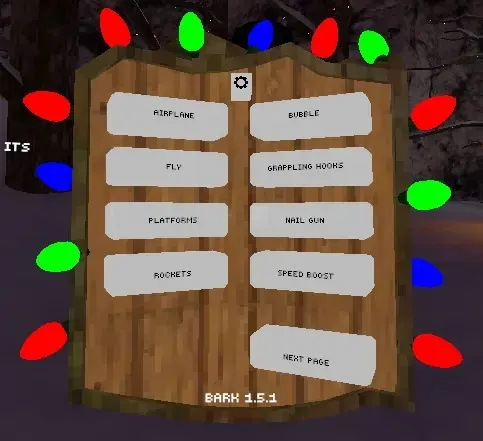
The Bark Mod Menu is one of the most widely recognized utility suites in the Gorilla Tag community. Originally created as an all-in-one sandbox companion for content creators and private lobby hosts, Bark integrates spectator camera management, in-game treehouse settings boards, and platform aids into a unified, cleanly compiled DLL.
In this release, Bark features deep integration with the Utilla room management API, ensuring that disruptive features are locked down whenever your client detects an unmodded public room.
Detailed Features & In-Game Controls
- Treehouse Settings Board: Mounts an interactive floating slate directly inside the treehouse near the computer terminal, allowing you to configure mod options with your physical hands.
- Cinematic Spectator Camera: Spawns a floating third-person camera that streams directly to your desktop monitor and OBS Studio for recording smooth YouTube and TikTok gameplay.
- Air Platform Controls: Squeeze your controller grips in private custom rooms to spawn solid hand platforms beneath your palms.
- Custom Player Visuals: Customize your trail renderers, color hues, and particle bursts for creative video shoots.
- Utilla Lobby Enforcement: Automatically detects public matchmaking and deactivates game-altering features to prevent account penalties.
Anti-Cheat Rules & Safe Usage
Using mod menus in public matchmaking is strictly prohibited. Another Axiom monitors public lobbies for speed modifications, flight scripts, and non-standard network packets. Using Bark’s menu features in public rooms will result in player reports and an automated matchmaking ban.
Rules for Safe Usage:
- Only launch Bark when connected to a private lobby with friends.
- Verify that Utilla is active to enforce room separation.
- Keep the menu closed and disabled when entering standard public games.
PC VR Installation Instructions
- Ensure BepInEx 5.4.21+ and Utilla are installed on your PC.
- Download
Bark.dllfrom the verified link below. - Move
Bark.dllinto:Gorilla Tag\BepInEx\plugins\ - Launch Gorilla Tag through SteamVR and head to the treehouse to interact with the Bark settings board.
Ready to Download?
Click below to go to the official verified repository for this mod. We only link to authorized releases on GitHub, mod.io, or Nexus Mods.
You Might Also Like
AZ Menu V6.5 for Gorilla Tag — Features, Private Lobby Rules & Guide
Download AZ Menu V6.5 for Gorilla Tag. Complete feature breakdown, controller binds, private room safety rules, and installation steps.
BARK ❷ for Gorilla Tag — Download & Install Guide
Download BARK ❷ for Gorilla Tag for free. Read our step-by-step setup guide and access direct download links for menus.

for Gorilla Tag — Download & Install Guide
Download for Gorilla Tag for free. Read our step-by-step setup guide and access direct download links for menus.