Bark Mod for Gorilla Tag — Download & Install Guide
What Is Bark Mod?
Bark Mod is one of the most versatile and comprehensive gameplay utility mods ever created for Gorilla Tag. Unlike simple single-purpose mods, Bark functions as an all-in-one suite, giving you access to spectator cameras, spawnable platforms, visual helpers, and custom UI panels. It is designed to enhance both your creative capabilities (like content creation and recording) and your custom gameplay mechanics.
When you install Bark, it introduces a toggleable menu system that you can control in VR. Players love Bark because it packs dozens of features into a single, clean DLL file. Whether you are a content creator looking to capture cinematic shots with a custom third-person camera, or a private room host wanting to set up a training course, Bark provides all the necessary utilities in one package.
What Does Bark Mod Add to Gorilla Tag?
Bark Mod adds a wide array of tools to your Gorilla Tag arsenal. Key features include:
- Custom Spectator Camera: Allows you to spawn and position a camera in the 3D space, showing a live third-person view on your monitor for easy streaming and recording.
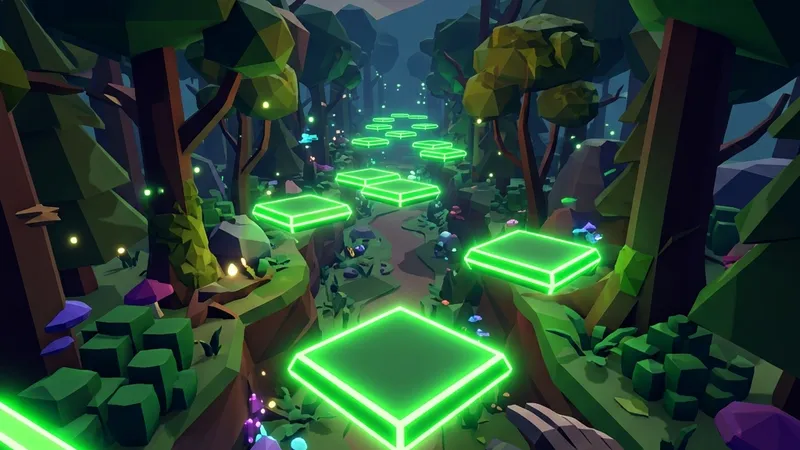
- Spawnable Platforms: Let you place solid grids under your hands in mid-air, allowing you to walk, climb, and stand in empty space.
- In-Game Settings UI: Displays a floating menu board in your treehouse, allowing you to edit settings and configure options without leaving VR.
- Visual Enhancements: Adds customized particles, trail renderers, and custom color patterns to your character model.
Is Bark Mod Safe to Use?
Bark Mod is an open-source, community-audited project, making it completely safe from a cybersecurity standpoint. It contains no malware or account-stealing scripts.
However, Bark Mod introduces features like spawnable platforms and flying capabilities. These features give you a massive competitive advantage and are highly visible to other players. If you use Bark’s platforms or movement modifiers in public queues, you will be reported and banned quickly by the game’s anti-cheat systems. To use Bark safely, you must only run it in private, modded custom rooms. Utilla will attempt to block its features in vanilla lobbies, but you must take personal responsibility and ensure you do not violate the game’s rules.
How to Install Bark Mod on Gorilla Tag
Below are the detailed setup guides for installing Bark Mod on both PC VR configurations and standalone Meta Quest systems.
On PC (Steam / Oculus Link PC)
Make sure you have BepInEx and Utilla installed on your PC before starting.
- Locate your plugins directory: Find your Steam directory, typically:
C:\Program Files (x86)\Steam\steamapps\common\Gorilla Tag\BepInEx\plugins\. - Download the DLL: Click the download button at the bottom of this page to go to the official GitHub releases. Download the latest
Bark.dllfile. - Install the file: Move the
Bark.dllfile directly into yourBepInEx\plugins\folder. - Launch Gorilla Tag: Open the game. Look for the floating Bark configuration board in the treehouse to confirm the installation is active.
On Meta Quest (Standalone / QuestPatcher)
Standalone Meta Quest players must install Quest-compatible modifications, as the PC version of Bark will not load on Android-based hardware:
- Enable Developer Mode on your Meta Quest headset.
- Open QuestPatcher on your PC and connect your Quest using a USB-C link cable.
- Select “Patch My Game” inside QuestPatcher to prepare the files.
- Drag and drop the Quest-compatible Bark
.qmodfile (if available) into the QuestPatcher screen. - Alternatively, check the QuestPatcher mod catalog under “Gameplay” to see if Bark or an equivalent platform/camera suite is listed for direct installation.
- Launch Gorilla Tag and configure settings via the terminal or in-game board.
Compatibility
Bark Mod is optimized for Windows PC VR setups running BepInEx 5.x.
Works on:
- Valve Index, HTC Vive, Oculus Rift, Meta Quest (via Link/AirLink/Virtual Desktop).
- Steam VR versions.
Important Notes:
- Some of Bark’s camera rendering tools require additional processing power. If you notice a drop in frame rates, open the Bark menu board and disable the secondary mirror or camera rendering options.
Frequently Asked Questions
How do I open the Bark settings menu in VR?
Why aren't my spawnable platforms appearing?
Can I configure Bark settings via a desktop config file?
Last updated: August 2026
Ready to Download?
Click below to go to the official verified repository for this mod. We only link to authorized releases on GitHub, mod.io, or Nexus Mods.
You Might Also Like
APE ARENA for Gorilla Tag — Download & Install Guide
Download APE ARENA for Gorilla Tag for free. Read our step-by-step setup guide and access direct download links for gameplay.

Banana Platforms Mod for Gorilla Tag — Download & Install Guide
Download Banana Platforms Mod for Gorilla Tag for free. Read our step-by-step setup guide and access direct download links for gameplay.
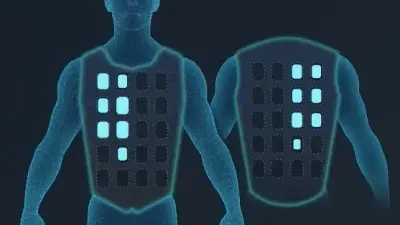
bHaptics Integration Mod for Gorilla Tag — Haptic Suit & Tactile Feedback
Download bHaptics Integration Mod for Gorilla Tag. Connect your TactSuit, TactSleeve, and TactVisor for full physical feedback on tag impacts and surface hits.