ShibaGT DARK Mod Menu for Gorilla Tag — Features, Private Rooms & Guide
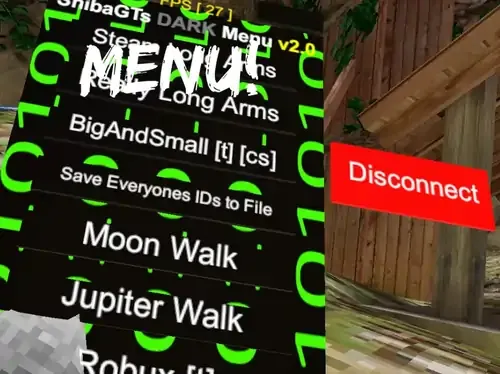
What Is ShibaGT DARK Mod Menu?
The ShibaGT DARK Mod Menu is an aesthetic, dark-themed utility dashboard designed for Gorilla Tag players exploring private sandbox servers. Distinguished by its high-contrast obsidian UI and green indicator LEDs, ShibaGT places an interactive option palette directly onto your left virtual hand controller.
Unlike bloated menus that cause memory leaks or stutters, the DARK edition focuses on lightweight code execution, minimal frame rate overhead, and clean integration with the Utilla room management API.
Technical Features & In-Game Controls
- Palm HUD Projection: Look at your virtual left wrist and press the Secondary Grip Trigger to project the floating dark-mode menu panel.
- Raycast Laser Selection: Point your right index finger at any button on the panel—a green laser indicator highlights buttons and triggers tactile haptic feedback.
- Room Diagnostics Panel: Live display of current Photon region, room code ping latency, and local client FPS counters.
- Offline Parkour Practice: Toggle low-gravity mode and checkpoint respawns when practicing difficult wall-scaling maneuvers in private custom rooms.
- Lobby Safeguard Hook: Automatically disables all gameplay toggles if your client connects to an official vanilla public matchmaking room.
Strict Anti-Cheat Notice
Never use gameplay modification menus in public Gorilla Tag lobbies. Another Axiom actively detects unauthorized physics packets and will issue immediate account bans to players reported for using menu scripts in public matchmaking.
To stay safe:
- Only launch ShibaGT DARK inside private custom rooms created for mod testing.
- Confirm your room status displays
MODDEDon the treehouse computer board. - Keep mods uninstalled when playing competitive infection or hunt modes.
PC VR Installation Guide
- Ensure BepInEx 5.4.21+ and Utilla are installed on your PC.
- Download
ShibaGTDark.dllusing the button below. - Copy the DLL file to:
C:\Program Files (x86)\Steam\steamapps\common\Gorilla Tag\BepInEx\plugins\ - Launch Gorilla Tag through SteamVR and join a private custom lobby code to test.
Ready to Download?
Click below to go to the official verified repository for this mod. We only link to authorized releases on GitHub, mod.io, or Nexus Mods.
You Might Also Like
AZ Menu V6.5 for Gorilla Tag — Features, Private Lobby Rules & Guide
Download AZ Menu V6.5 for Gorilla Tag. Complete feature breakdown, controller binds, private room safety rules, and installation steps.
BARK ❷ for Gorilla Tag — Download & Install Guide
Download BARK ❷ for Gorilla Tag for free. Read our step-by-step setup guide and access direct download links for menus.

for Gorilla Tag — Download & Install Guide
Download for Gorilla Tag for free. Read our step-by-step setup guide and access direct download links for menus.