HudBud Mod Menu for Gorilla Tag – PC Setup and Honest Risks
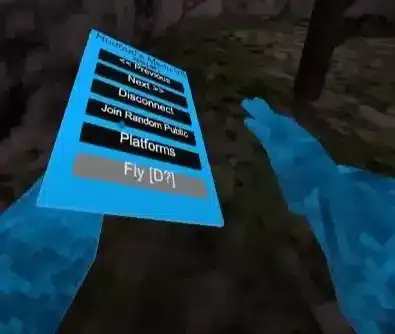
HudBud Mod Menu is one of the many PC mod menus that circulate in the Gorilla Tag community, mostly through Discord servers and YouTube showcase videos. We couldn’t find an official source page, changelog or verified author for it, so rather than repeat claims nobody can check, this page covers what you actually need to know before running it.
Installing a PC plugin like this
PC mods for Gorilla Tag are DLL plugins loaded by BepInEx 5 (x64). The usual stack is BepInEx in the game folder, run the game once, then the plugin goes in Gorilla Tag/BepInEx/plugins. Many mods also want Utilla. The legoandmars original stopped at 1.6.14 in 2024, and current builds come from the maintained sirkingbinx/Utilla (1.7.2 as of October 2026).
Malware warning
Mod menus are a common way to spread malware in this scene. The Gorilla Tag wiki specifically warns that some “menus” are remote-access trojans. Scan any download, never run an .exe that claims to be a menu, and be suspicious of anything asking for your Discord or Steam login.
Does it work on Quest?
Short answer: only through a PC. The game has to be running on Steam with BepInEx; a Quest connected by Link or Virtual Desktop counts, a Quest on its own doesn’t.
Public lobbies: don’t
Menus like this are what Gorilla Tag’s anti-cheat and report system are built to catch. Another Axiom’s terms forbid cheating and unauthorised access, and the community wiki is blunt that every mod carries some ban risk. Using menu features in public lobbies is the fastest way to lose your account. “Anti-report” toggles don’t change that. Players on the Steam forums who relied on them still got banned.
Keep it to private codes and modded gamemodes, and never on an account you care about.
Common problems
Defender removed something. BepInEx’s winhttp.dll proxy gets quarantined fairly often. Restoring it is fine if BepInEx came from its GitHub releases. A flagged menu DLL deserves more suspicion, not less.
Nothing happens in-game. Open BepInEx/LogOutput.log and search for HudBud Mod Menu. No mention means BepInEx never loaded it. Usually that’s the wrong folder, a missing dependency, or a build compiled against an older game.
Broke after an update. Game patches change the code mods hook into. If nobody maintains HudBud Mod Menu, it stays broken. There’s no setting to fix that.
Questions people ask
Does HudBud Mod Menu work in public lobbies?
Can I use HudBud Mod Menu on a Quest 3 or Quest 2?
Is there a changelog?
Ready to Download?
Click below to download this mod. Links point to the developer's official release (mod.io, GitHub) where available, or to an unmodified mirror of the original file when the official link is gone.
Recommended Modding Guides
Step-by-step tutorials to help you safely install, configure, and troubleshoot Gorilla Tag mods.
You Might Also Like
AZ Menu for Gorilla Tag – PC Setup and Honest Risks
AZ Menu is a fan-made Gorilla Tag PC mod with no verified official source. Here's how it loads with BepInEx, Quest vs Steam limits, where to use it safely, and fixes.
Bark Mod for Gorilla Tag by KyleTheScientist – All Modules & Install
Bark by KyleTheScientist adds a summonable 3D menu with fly, grapple, wall run, potions and more, only in modded lobbies. Full module list and install for v1.5.1.
BARK ❷ [V1.0.3] – Gorilla Tag Gamemode by Silvaz_
BARK ❷ [V1.0.3] by Silvaz_: [UNOFFICIAL] Bark menu by KyleTheScientist ported to. Load it via the Virtual Stump on Quest and PC.