[FALL UPDT] Gorilla Tag but Low Quality – Gorilla Tag Map
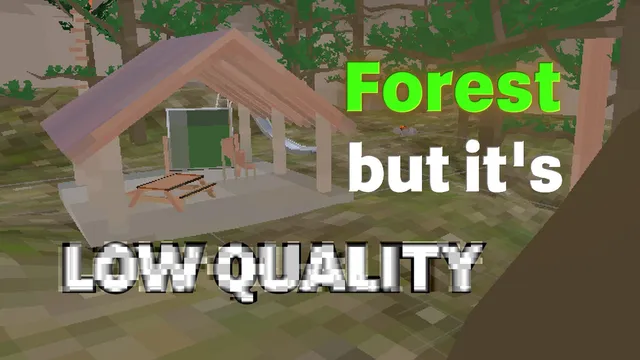
FateVRGT built [FALL UPDT] Gorilla Tag but Low Quality, a large map you load through Gorilla Tag’s Virtual Stump. The creator’s one-line pitch: “This is Gorilla Tag but the texture quality is EXTREMELY BAD.” Tags on the listing: challenge, competitive, minigames, roleplay, hangout.
What’s in [FALL UPDT] Gorilla Tag but Low Quality
Here’s how FateVRGT describes it on the listing:
FALL UPDATE OUT NOW!!!!
Yo Yo Yo! Welcome to Gorilla Tag but Low Quality! Check out all of the low quality maps and complete your quests! if you’re a content creator, you can post a video on this map to make it onto the Content Board and you get free shoutouts!
Join the Discord:
At a glance
- Creator: FateVRGT (mod.io/g/gorilla-tag/u/fatevrgt)
- Official page: mod.io/g/gorilla-tag/m/gorilla-tag-but-low-quality
- Current file version: V2.2
- Went live on mod.io: June 9, 2026
- Last updated: October 11, 2026
- Download size: about 29 MB
- Map size tag: Large
- Player rating: Very Positive (92% positive from 118 ratings, checked October 28, 2026)
- Downloads: 32,104 total as of October 28, 2026
Getting into [FALL UPDT] Gorilla Tag but Low Quality
[FALL UPDT] Gorilla Tag but Low Quality doesn’t need BepInEx or any PC mod loader. It runs through the official mod.io integration, so it works on Quest and on Steam/PC VR.
- Subscribe to [FALL UPDT] Gorilla Tag but Low Quality at mod.io/g/gorilla-tag/m/gorilla-tag-but-low-quality while logged in to the mod.io account you’ve linked to Gorilla Tag.
- In City, walk into the Arcade and use a green VR headset; that takes you to the Virtual Stump.
- First time? Link your account from the mod.io screen in the Stump by entering its code at mod.io/connect.
- Use the terminal to filter to installed maps, then select [FALL UPDT] Gorilla Tag but Low Quality and press load. It’s around 29 MB, so the first load takes a bit.
Note: accounts registered as under 13 can’t enter the Virtual Stump.
Tips
- It’s tagged as a challenge/race map, so expect to restart sections. Learning one route properly beats rushing.
- It’s tagged Hangout, which usually means it’s best with a few friends in a private code rather than a full random lobby.
- The Roleplay tag means much of the fun depends on the group you play with. Agree on the scenario before you start.
- With competitive or minigame tags, sessions play better when everyone has already loaded the map before the round starts.
- FateVRGT updated it recently (October 11, 2026), so if something feels different from a video you watched, that’s probably why.
More from FateVRGT on GTMods: Fate’s Recording Studio [CUSTOM ROOMS!!].
[FALL UPDT] Gorilla Tag but Low Quality FAQ
Who made [FALL UPDT] Gorilla Tag but Low Quality?
Does [FALL UPDT] Gorilla Tag but Low Quality work on Quest?
How big is the [FALL UPDT] Gorilla Tag but Low Quality download?
Why isn't [FALL UPDT] Gorilla Tag but Low Quality showing up for me?
Ready to Download?
Click below to download this mod. Links point to the developer's official release (mod.io, GitHub) where available, or to an unmodified mirror of the original file when the official link is gone.
Recommended Modding Guides
Step-by-step tutorials to help you safely install, configure, and troubleshoot Gorilla Tag mods.
You Might Also Like
Comic Kev Badge – Gorilla Tag Custom Map by ametryxt
Comic Kev Badge by ametryxt: After a long time of waiting, Ametryxt presents: The Comic. Load it via the Virtual Stump on Quest and PC.
FOV Changer Mod for Gorilla Tag – How Wider FOV Works on PC
How Gorilla Tag FOV changer mods work on PC, with NachtsFOV as an open-source example (40–170 slider, F key), plus why wide FOV feels odd in VR and how to reset it.

❷PotTheMan's GorillaCon❷ – Gorilla Tag Custom Map by PotTheMan
❷PotTheMan's GorillaCon❷ by PotTheMan: To Broke To go to Vidcon/GorillaCon? Then Here's A Custom. Load it via the Virtual Stump on Quest and PC.